UDID is an important online service provided by the Government of India for persons with disabilities. UDID stands for Unique Disability ID, a nationwide initiative launched by the Department of Empowerment of Persons with Disabilities under the Ministry of Social Justice and Empowerment. The official portal https://swavlambancard.gov.in/ allows users to apply for a UDID card, track application status, and download the card online.
The UDID project aims to create a centralized database of persons with disabilities and provide them with a single identity document that can be used across India. This eliminates the need for multiple disability certificates and simplifies access to government schemes, benefits, and services.
What is UDID Card?
The UDID card is a unique identification card issued to individuals with disabilities. It contains important details such as personal information, type of disability, and percentage of disability. The card is valid across the country and can be used to avail benefits like scholarships, pensions, travel concessions, and healthcare services.
The initiative ensures transparency, reduces duplication, and makes it easier for beneficiaries to access various welfare schemes.
UDID Login – Step-by-Step Process
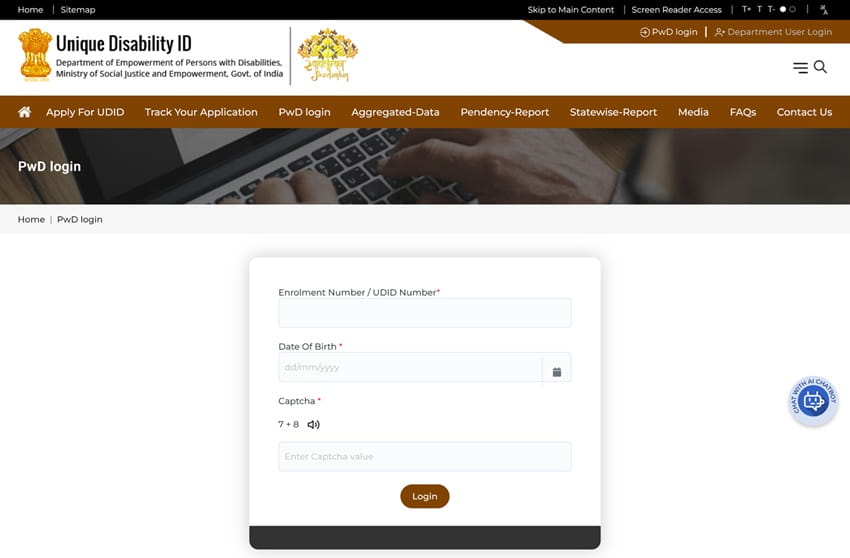
Follow these steps to log in to your UDID account:
- Visit the official login page: https://swavlambancard.gov.in/login
- Enter your Enrollment Number / UDID Number / Mobile Number
- Enter your Password
- Fill in the Captcha Code
- Click on the Login button
- You will be redirected to your dashboard
From the dashboard, you can manage your application, download your UDID card, and update details.
How To Apply for UDID Card Online
If you are a new user, you need to apply online for the UDID card.
Steps to Apply:
- Visit the application page: https://swavlambancard.gov.in/Applyforudid
- Click on “Apply for UDID”
- Fill in your personal details (name, address, date of birth)
- Enter disability details
- Upload required documents
- Submit the application form
- Note down your enrollment number
After submission, your application will be forwarded for verification and medical assessment.
Documents Required for UDID Application
To apply for a UDID card, you need the following documents:
- Aadhaar Card
- Address proof
- Disability certificate (if available)
- Passport-size photograph
- Identity proof
Ensure that all documents are clear and valid to avoid rejection.
How To Track UDID Application Status
You can easily track your application status online.
Steps to Track Status:
- Visit: https://swavlambancard.gov.in/track-your-application
- Enter your Enrollment Number or UDID Number
- Enter the Captcha Code
- Click on Search
- Your application status will be displayed
This feature helps applicants stay updated on approval or pending status.
How To Download UDID Card
Once your application is approved, you can download your UDID card.
Steps to Download:
- Visit the login page
- Log in using your credentials
- Go to the Download UDID Card section
- Click on Download
- Save the card in PDF format
- Print it for future use
The digital card is valid and can be used for official purposes.
Key Features of UDID Portal
The UDID portal offers several useful features:
- Single disability ID valid across India
- Online application and tracking
- Digital card download
- Centralized database
- Easy access to government schemes
- Transparent and paperless system
These features make it highly beneficial for persons with disabilities.
Common Login Issues and Solutions
Some users may face login problems. Here are common issues and fixes:
- Forgot Password: Use the “Forgot Password” option to reset it
- Incorrect Details: Check enrollment number or mobile number
- Captcha Error: Enter correct captcha or refresh page
- OTP Not Received: Check mobile network
- Website Not Opening: Try different browser or later
Benefits of UDID Card
The UDID card provides multiple benefits:
- Acts as a universal disability identity
- Eliminates need for multiple documents
- Helps in availing government schemes
- Easy verification process
- Saves time and effort
- Recognized across India
It ensures better inclusion and support for persons with disabilities.
Conclusion
UDID Login and portal services have made it easier for persons with disabilities to apply for and manage their disability identity card. With features like online application, status tracking, and card download, the system is efficient and user-friendly.
By using the official portal and following the correct steps, applicants can easily get their UDID card and access various government benefits. This initiative is a major step toward digital empowerment and social inclusion in India.
FAQs on UDID Login
Q. What is the official website for UDID?
The official website is https://swavlambancard.gov.in/.
Q. Who can apply for UDID card?
Any person with a recognized disability in India can apply.
Q. What is required for login?
You need enrollment number, UDID number, or mobile number and password.
Q. How long does approval take?
It depends on verification, but usually takes a few weeks.
Q. Is UDID card mandatory?
It is not mandatory but highly recommended.
Q. Can I update details after applying?
Yes, after logging in, you can update certain details.
Q. Is the UDID card valid across India?
Yes, it is valid nationwide.
Q. What if my application is rejected?
You can reapply or contact the concerned authority.
Q. Is there any fee for applying?
No, the application is free.
Q. Can I download the card online?
Yes, after approval, you can download it from the portal.
