Ejanma Login is an online service provided by the Government of Karnataka that allows citizens to access birth and death registration services digitally. The official portal https://ejanma.karnataka.gov.in/ is designed to simplify the process of registering vital events, downloading certificates, and checking application status without visiting government offices. This initiative is part of Karnataka’s e-governance system, making public services more accessible, transparent, and efficient.
Earlier, people had to visit municipal offices or gram panchayats to register births and deaths, which often involved long queues and delays. With the Ejanma portal, the entire process has become online, allowing users to apply, verify, and download certificates from the comfort of their homes. It is especially useful for parents, hospitals, and local authorities who regularly deal with birth and death registrations.
What is Ejanma Portal?
Ejanma is a centralized digital platform launched by the Government of Karnataka to manage birth and death records across the state. It connects hospitals, local bodies, and government departments into a single system, ensuring accurate and timely registration of vital records.
Through this portal, users can:
- Register birth and death details
- Apply for certificates
- Download digitally signed certificates
- Track application status
- Access official records anytime
The platform plays a crucial role in maintaining official identity records, which are required for education, passports, government schemes, and other legal purposes.
Steps to Login on Ejanma Portal
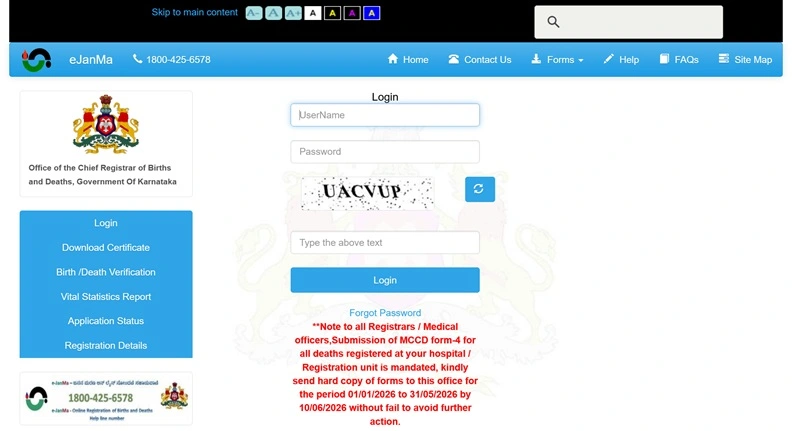
Follow these simple steps to access your account:
- Visit the official login page: https://ejanma.karnataka.gov.in/frmLogin.aspx
- Enter your Username
- Enter your Password
- Select the appropriate user type (if applicable)
- Enter the Captcha code shown on the screen
- Click on the Login button
- You will be redirected to your dashboard
Once logged in, you can manage records, check status, and download certificates.
Registration Process on Ejanma
For general users, direct self-registration is limited. Most registrations are done through:
- Hospitals (for birth registration)
- Local authorities or municipalities
- Gram Panchayat offices
However, if you are an authorized user (such as a hospital staff or official), you can register through the system provided by the government department.
For citizens, the process usually involves:
- Visiting a hospital or local registration office
- Providing required details (birth/death information)
- Submitting documents
- Getting the record entered into the Ejanma system
- Receiving an acknowledgment or registration number
After this, you can use the portal to check status or download certificates.
How to Check Status on Ejanma
You can easily track your application or certificate status online:
- Visit the public home page: https://ejanma.karnataka.gov.in/frmPublicHome.aspx
- Look for the “Search Birth/Death Records” option
- Enter required details such as:
- Registration number
- Name
- Date of birth/death
- Click on Search
- Your record status will be displayed
This feature helps users confirm whether their certificate has been processed or is still pending.
How to Download Birth or Death Certificate
Once your record is available, you can download the certificate online:
- Visit the official website
- Go to the search section
- Enter registration details
- Locate your record
- Click on Download Certificate
- Save or print the document
The downloaded certificate is digitally verified and can be used for official purposes.
Documents Required
To register or verify records on Ejanma, the following documents are generally required:
- Hospital record or discharge summary
- Aadhaar card of parents or deceased
- Address proof
- Identity proof
- Affidavit (in some cases)
Make sure all details are accurate to avoid delays.
Common Login Issues and Solutions
Users may face some issues while accessing the portal. Here are common problems and fixes:
- Forgot Password: Contact your department or admin to reset credentials
- Wrong Username/Password: Double-check login details
- Captcha Error: Enter correct captcha or refresh the page
- Website Not Loading: Try again later or switch browser
- Access Denied: Ensure you are an authorized user
Since login access is mainly for officials, general users may not always require login to access services.
Ejanma Support and Contact Details
If you face any issues related to login, certificate download, or record correction, you can contact the official Ejanma support team using the details below:
📧 Email Support
- Email ID: ejanmahelpdesk@gmail.com
☎️ Helpline Numbers
- Toll-Free Number: 1800-425-6578
- Phone Numbers:
- 080-22869711
- 080-22869721
- 080-22869731
- 080-22869751
👉 These numbers are usually available during office hours (approx. 10 AM to 5 PM).
🏢 Office Address (Reference)
- Office of the Registrar / DC Office
- Revenue Complex, K.G. Road
- Bengaluru – 560009, Karnataka
💡 Important Support Tips
- Keep your registration number, name, and date of birth/death ready before contacting support
- For local issues, contact your nearest municipal office / gram panchayat / registrar office
- District-level offices often resolve issues faster than central helpdesk
- Try calling in the morning (10–11 AM) for quicker response
Benefits of Ejanma Portal
The Ejanma system offers several advantages:
- Completely digital and time-saving
- Reduces paperwork and manual errors
- Provides quick access to certificates
- Ensures transparency in records
- Available 24/7 online
- Useful for legal and official purposes
It has significantly improved the efficiency of public services in Karnataka.
Conclusion
Ejanma Login and portal services have transformed how birth and death registrations are handled in Karnataka. With easy access to records, online status tracking, and downloadable certificates, the system has made the process faster and more reliable.
Whether you are a citizen looking to download a certificate or an official managing records, understanding how to use the Ejanma portal can save time and effort. Always use the official website and ensure your details are correct for a smooth experience.
FAQs on Ejanma Login
Q. What is the official website of Ejanma?
The official website is https://ejanma.karnataka.gov.in/.
Q. Who can use Ejanma Login?
Login access is mainly for authorized users like hospital staff and government officials.
Q. Can citizens register directly on Ejanma?
No, registration is usually done through hospitals or local authorities.
Q. How can I check my birth certificate status?
Visit the public portal and use the search option with your details.
Q. Is it free to download certificates?
Yes, in most cases, downloading certificates is free or minimal cost may apply.
Q. What should I do if my record is not found?
Contact your local registration office or check details again.
Q. Can I correct details in my certificate?
Yes, but you need to contact the concerned authority for corrections.
Q. Is Ejanma available for all districts in Karnataka?
Yes, it is a state-wide system covering all districts.
Q. What details are required to search records?
You need name, date, or registration number.
Q. Is the certificate valid for official use?
Yes, digitally issued certificates are valid for all official purposes.
