FinAssam Employee Login is an online facility provided by the Finance Department of the Government of Assam to help state government employees access their salary and financial details easily. Through the official portal https://fin.assam.gov.in/, employees can log in to the Employee Self Service (ESS) system and manage their payroll-related information without visiting their department physically.
The FinAssam portal has been introduced to bring transparency, efficiency, and convenience to financial management. Earlier, employees had to depend on their department or accounts office to get salary slips and other records. Now, everything is available online, including payslips, salary details, and employee information. This system saves time, reduces paperwork, and allows employees to access their records anytime and from anywhere.
Who Can Use FinAssam Employee Login?
The FinAssam Employee Login is specifically designed for:
- Assam Government employees
- Department staff and officials
- Employees registered under the state payroll system
Each employee is provided with login credentials such as Employee ID and password, which are required to access the portal.
Steps to Login on FinAssam Portal
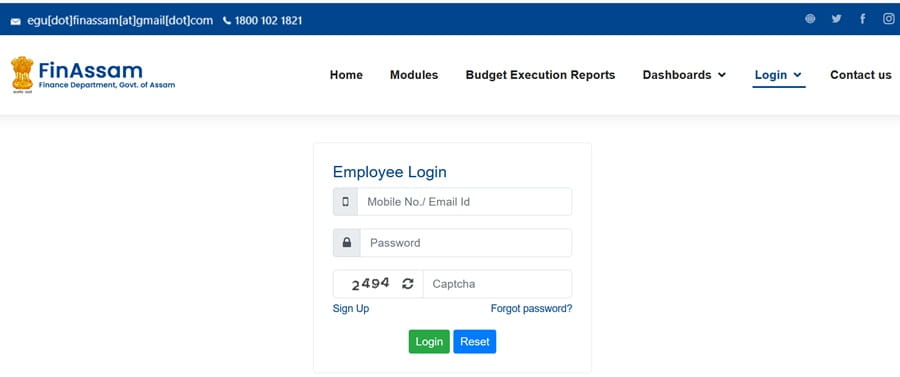
Follow these simple steps to log in to your account:
- Visit the official login page: https://fin.assam.gov.in/ess/gotoEmpLogin
- Enter your Employee Code or User ID
- Enter your Password
- Fill in the Captcha Code displayed on the screen
- Click on the Login button
- After successful login, your dashboard will open
From the dashboard, you can access salary details, download payslips, and manage your account.
FinAssam Employee Registration Process
If you are a new employee and do not have login credentials, you need to register on the portal.
Steps to Register:
- Visit the registration page: https://fin.assam.gov.in/ess/gotoEmpSignUp
- Enter your Bank Account Number
- Enter your IFSC Code
- Fill in the Captcha Code
- Click on Continue
- Enter your Employee Details
- Create a Username and Password
- Provide your Mobile Number
- Verify your number using OTP
- Submit the registration form
Once registration is complete, you can log in using your credentials.
How to Download Salary Slip on FinAssam
The FinAssam portal allows employees to download their salary slips easily.
Steps to Download Salary Slip:
- Log in to the FinAssam portal
- Go to the Salary Slip or Payslip section
- Select the Month and Year
- Click on View or Generate Payslip
- Download the payslip in PDF format
- You can also print it for official use
This feature is very useful for employees who need salary proof for loans, tax filing, or other purposes.
Key Features of FinAssam Portal
The portal offers several useful features for employees:
- Online access to salary details
- Easy download of monthly payslips
- Transparent information on deductions and earnings
- Secure login system
- 24/7 accessibility
- Reduced paperwork and faster service
These features make the system efficient and user-friendly.
Details Required for Registration
Before registering, make sure you have the following details:
- Employee ID or Code
- Bank Account Number
- IFSC Code
- Registered Mobile Number
- Basic employment information
Providing correct details is important for successful registration.
Common Login Issues and Solutions
Some users may face problems while logging in. Here are common issues and their solutions:
- Forgot Password: Use the “Forgot Password” option to reset it
- Incorrect Details: Double-check your Employee ID and password
- OTP Not Received: Check your mobile network or registered number
- Website Not Working: Try another browser or clear cache
- Account Not Active: Contact your department office
Benefits of FinAssam Employee Login
The FinAssam portal offers many benefits:
- Saves time by eliminating manual processes
- Provides quick access to salary information
- Improves transparency in payroll
- Allows easy tracking of financial records
- Accessible anytime from mobile or computer
- Reduces dependency on office staff
This system is a major step toward digital governance in Assam.
Conclusion
FinAssam Employee Login is a helpful and efficient platform for Assam government employees to manage their financial information online. From logging in and registering to downloading salary slips, the portal provides all essential services in one place.
By using the official website and following the correct steps, employees can easily access their salary details and stay updated with their financial records. The FinAssam portal not only simplifies processes but also ensures transparency and convenience for all users.
FAQs on FinAssam Employee Login
Q. What is the official website of FinAssam?
The official website is https://fin.assam.gov.in/.
Q. Who can use FinAssam Employee Login?
Only Assam Government employees can use this portal.
Q. What is required to log in?
You need your Employee ID/User ID and password.
Q. How can I register on FinAssam?
You can register through the official Sign Up page using your bank and employee details.
Q. How to download salary slip from FinAssam?
Log in, go to the payslip section, select the month, and download the PDF.
Q. What should I do if I forget my password?
Use the “Forgot Password” option to reset it.
Q. Is the portal free to use?
Yes, it is completely free for employees.
Q. Can I access it on mobile?
Yes, the portal works on mobile browsers.
Q. Why is my login not working?
It may be due to incorrect details or server issues.
Q. Who manages the FinAssam portal?
It is managed by the Finance Department of Assam Government.
